How to Schedule TikTok Posts in Advance (2026 Guide)
You can schedule TikTok posts in advance up to 10 days out using TikTok Studio, with a Creator or Business account. Here is how to do it, what the native limits are, how to plan the Black Friday rush, and how to queue TikTok, Reels, and Shorts weeks ahead from one calendar.
Key takeaways
- TikTok's native scheduler caps out at 10 days in advance, lives in TikTok Studio rather than the main TikTok app, and requires a Creator or Business account.
- Instagram allows scheduling up to 75 days ahead and up to 25 posts per day through Meta Business Suite, a much longer window than TikTok gives you.
- YouTube Studio publishes no documented maximum for scheduling Shorts, so queueing months ahead is normal there.
- Native schedulers do not talk to each other, so a three-platform calendar means three separate queues unless you use one publishing tool across all of them.
- Black Friday 2026 falls on November 27 and Cyber Monday on November 30, so a holiday TikTok queue needs to be built by mid-November, when TikTok's 10 day window only reaches about a week ahead.
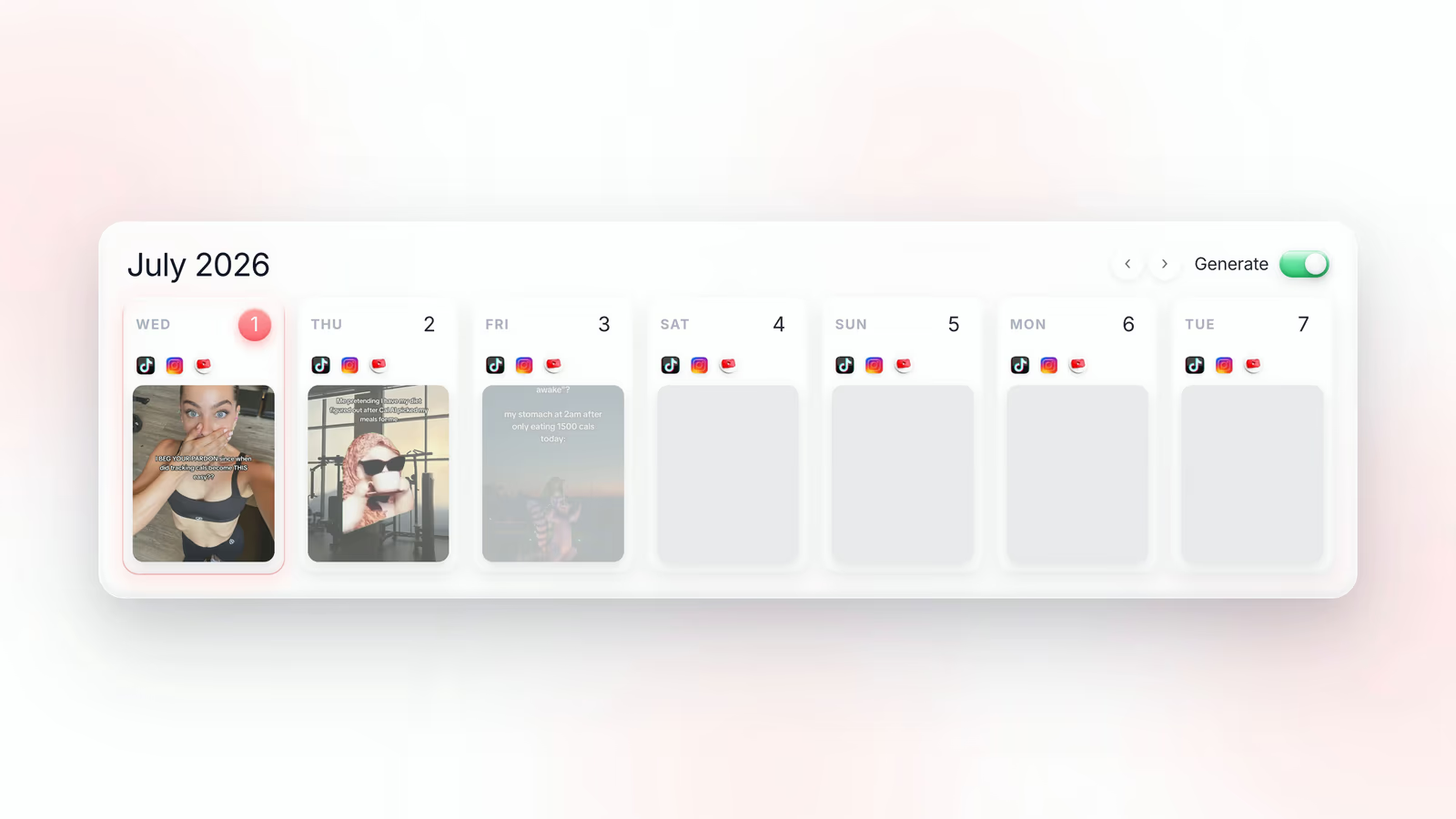
- Fastlane generates the content from your website URL and schedules it weeks ahead to TikTok, Instagram Reels, and YouTube Shorts from a single calendar, starting on a free plan with no credit card.
You can schedule TikTok posts in advance, but the native window is short. TikTok Studio lets Creator and Business accounts pick a future publish date and time up to about 10 days out, and the option lives in TikTok Studio (on desktop web or a mobile browser), not in the main TikTok app you scroll. That is enough to cover a week of planned content and nothing more. If you are trying to run a real content calendar across TikTok, Instagram Reels, and YouTube Shorts, you will hit the ceiling fast, and this guide covers both the native steps and what to do once 10 days is not enough.
Can you schedule TikTok posts in advance?
Scheduling a TikTok post means uploading the video now and telling TikTok to publish it automatically at a chosen date and time later. TikTok supports this natively through TikTok Studio, its creator dashboard. When you upload, instead of hitting Post you switch on the option to publish at a later date, then pick a day and a time slot. The video sits in a queue and goes live on its own.
The one hard requirement is account type. Scheduling is only offered to Creator and Business accounts. If you are on a personal account, the toggle simply does not appear, and switching account type in your settings is the fix. That switch is free and takes under a minute.
How far in advance can you schedule TikTok posts?
TikTok's native scheduler is capped at roughly 10 days ahead. Dates past the limit are greyed out in the date picker, so there is no way to talk your way past it. As of late 2026, guides still consistently report the same 10 day ceiling, and TikTok has not published a longer window, so 10 days is the number you should plan against.
Ten days is an awkward number. It is longer than a week, so it does not line up with a weekly planning rhythm, and it is far shorter than the month or quarter that most marketing calendars are built around. In practice it means logging back in every single week to top up the queue, forever.
How do you schedule a TikTok post step by step?
- Switch your account to Creator or Business in Settings, under Account, if you have not already.
- Open TikTok Studio on desktop web, or in a mobile browser, and choose Upload.
- Add your video file, then write the caption, hashtags, and cover frame as normal.
- Turn on the schedule option, usually labelled as publishing at a later date.
- Pick a date within the allowed window and a publish time, keeping your audience's time zone in mind rather than your own.
- Confirm, then check the scheduled queue afterwards to make sure the post is actually sitting there.
One detail people miss: some interactive features have to be set in the main app, not the scheduler. If a post depends on a specific trending sound, a Duet, or a Stitch, verify it survived the scheduled upload rather than assuming it did.
What are the limits of TikTok's native scheduler?
- The 10 day ceiling, which forces weekly manual top-ups of the queue.
- No scheduling button in the main TikTok app, so planning on the go means opening TikTok Studio in a browser or using a laptop.
- Personal accounts are excluded entirely.
- One platform only: nothing you schedule in TikTok Studio touches Instagram or YouTube.
- No content generation, so the scheduler assumes you already have finished videos sitting on a drive.
That last point is the real bottleneck. The scheduler is not what stops most brands from posting daily. Producing 30 videos a month is what stops them. A queue is only useful if there is something to put in it.
How far ahead can you schedule Instagram Reels and YouTube Shorts?
The windows are wildly inconsistent across platforms, which is exactly why cross-platform planning gets messy. Instagram, through Meta Business Suite, allows scheduling up to 75 days in advance, with a ceiling of 25 posts per day counted across single images, carousels, and Reels together. That is more than two months of runway, roughly seven times what TikTok gives you.
YouTube is the most permissive of the three. YouTube Studio lets you upload a Short, set visibility to Scheduled, and choose a publish date, and YouTube does not publish a documented maximum for how far out you can go. Creators routinely queue many months ahead without hitting a wall.
So a single content calendar spanning all three platforms has to respect a 10 day limit, a 75 day limit, and an open-ended one at the same time. Managed natively, that means three dashboards, three upload flows, and three queues that drift out of sync the moment you change a plan.
Does scheduling in advance hurt your reach?
The persistent worry is that scheduled posts get throttled. The thing that actually matters is how the post reaches the platform. When you use TikTok's own scheduler, or a tool publishing through official platform APIs, the video is uploaded natively and enters the feed the same way a manual upload does. Nothing about it is second class.
The risk was never scheduling. It was tools that push content through unofficial back doors instead of the platform's own publishing API.
The practical advice is simple: check that whatever tool you use is an official publishing partner and posts natively. Fastlane does, which is why scheduled posts behave like anything else you upload by hand.
How many posts should you schedule ahead?
Two to four weeks is the sweet spot for most brands. Less than that and you are back in the weekly scramble that scheduling was supposed to eliminate. Much more than a month and your queue starts going stale, because short-form is trend-sensitive and a video written six weeks ago often references a format that has already peaked.
A good compromise is a stable base layer plus a reactive layer. Schedule your evergreen content, product explainers, hook plus demo videos, and slideshows several weeks out, then leave one or two slots per week open for trend-driven posts you make that week. You get consistency without looking like you are broadcasting from the past.
How should you schedule TikTok posts for Black Friday and the holidays?
The holiday rush is where the 10 day ceiling hurts most. In 2026, Thanksgiving is on November 26, Black Friday on November 27 and Cyber Monday on November 30, and most brands want a teaser run in the week before plus daily posts through the weekend. Because TikTok will only accept dates about 10 days out, you cannot load that whole run in early November. You can only start queueing the Black Friday posts themselves around November 17.
- Make every holiday video by mid-November, so the scheduling window is the only constraint left.
- Split the run into a teaser phase, a launch day post for Black Friday, weekend follow-ups, and a Cyber Monday last call.
- Load TikTok in rolling 10 day blocks, and set a reminder for the day the Cyber Monday slots become schedulable.
- Keep one open slot per day for a trend or a reply video, since holiday weekends move fast.
- Schedule the same videos to Instagram Reels and YouTube Shorts at the same time, rather than rebuilding three queues.
A cross-platform scheduler removes the rolling top-ups entirely: you build the full Thanksgiving to Cyber Monday run once and it publishes natively to every platform on the right day.
How do you schedule TikTok, Reels, and Shorts from one calendar?
This is the job Fastlane was built for. Fastlane is an AI platform that takes your website URL, learns what you sell, generates short-form content from it, and publishes that content natively to TikTok, Instagram Reels, and YouTube Shorts on a schedule you set weeks ahead. Instead of three native queues with three different ceilings, you plan once on one calendar.
It also fills the queue, which native schedulers do not. Fastlane produces hyper-realistic AI UGC videos from a library of over 1,000 AI UGC characters, slideshows for TikTok and Instagram, hook plus demo videos, and memes, and it remixes live trends so the content stays current rather than dated. Blitz mode gives you a Tinder-style swipe through everything generated, so approving a month of posts takes minutes instead of an afternoon.
Once posts go live, unified analytics attribute signups and sales back to individual posts, so you can see which scheduled video actually produced revenue instead of guessing from view counts. For teams that want to go further, there is a developer API and MCP, a Whitelabel and Partner API for agencies, and human-warmed TikTok and Instagram accounts created from scratch by real people in up to 12 countries and warmed for 5 days in your niche.
Where to start
If you only need to cover the next week, TikTok Studio is genuinely fine, and it costs nothing. Switch to a Creator or Business account, upload on desktop, and set your publish times. The moment you need more than 10 days of runway, or you want the same calendar to cover Instagram Reels and YouTube Shorts too, the native tools run out of road.
That is where Fastlane picks up: paste your URL, let it generate the content, swipe to approve, and schedule weeks of posts across all three platforms at once. There is a free plan with no credit card required, and paid plans start at $29 per month. Over 50,000 users are already running their short-form calendars this way. Go to usefastlane.ai to set up your first scheduled week.
Frequently asked questions
Can you schedule TikTok posts in advance?
Yes, TikTok has a built-in scheduler in TikTok Studio that lets Creator and Business accounts pick a future publish date and time instead of posting immediately.
How far in advance can you schedule TikTok posts?
TikTok's native scheduler is widely reported to cap at 10 days ahead, with dates beyond that greyed out in the date picker.
Can you schedule TikTok posts from your phone?
Not from the main TikTok app: scheduling lives in TikTok Studio, which you open on desktop web or in a mobile browser, so phone scheduling means going through Studio rather than the app you scroll.
Do you need a Business account to schedule TikTok posts?
You need either a Creator or a Business account, because personal accounts do not get the scheduling option at all.
Does scheduling posts in advance hurt your TikTok reach?
Publishing through TikTok's own scheduler or an official publishing partner uploads the video natively, so it enters the For You feed the same way a manual upload does.
When should you schedule TikTok posts for Black Friday 2026?
Have the full Black Friday and Cyber Monday batch made by mid-November 2026, then load TikTok's queue in rolling 10 day windows or schedule the whole run at once with a cross-platform tool.
How far ahead can you schedule Instagram Reels?
Meta Business Suite supports scheduling Reels up to 75 days in advance, with a cap of 25 posts per day across images, carousels, and Reels combined.
Can you schedule TikTok, Instagram Reels, and YouTube Shorts from one place?
Yes, Fastlane publishes natively to all three from one calendar, so you build the schedule once instead of maintaining three separate native queues.
What does Fastlane cost?
Fastlane has a free plan with no credit card required, and paid plans start at $29 per month.