Batch Content Creation: A Month of Short-Form Posts in a Day
Batch content creation means making a month of short-form posts in one session instead of one video a day. Here is the four-stage batching workflow, how much to overshoot, and how to approve a whole batch in minutes.
Key takeaways
- Batch content creation is the practice of producing many finished posts in one concentrated session and scheduling them out, instead of making one post per day.
- A batching session has four stages: generate a surplus, approve fast, schedule the keepers, then leave the calendar alone until the next session.
- Generating roughly three times the posts you intend to publish is what makes a batch worth having, because approval, not generation, is where quality gets decided.
- Fastlane's Blitz mode turns approval into a Tinder-style swipe, so a month of generated posts gets sorted in minutes rather than an afternoon.
- Fastlane batches short-form content from a website URL and schedules the approved posts natively to TikTok, Instagram Reels and YouTube Shorts, starting on a free plan with no credit card.
Batch content creation is the practice of making a large block of social posts in one concentrated session, then scheduling them out over the following weeks instead of creating something new every day. For short-form video the batch is usually a month. You sit down once, generate far more clips than you need, keep the ones worth posting, fill the calendar, and close the laptop. The daily scramble disappears, and what replaces it is a single recurring session you can actually defend in a calendar.
What is batch content creation?
Batch content creation is a production method in which one working session produces many finished posts rather than one. The posts are then queued and published on a schedule, so creation and publication are separated in time. The idea comes from manufacturing, where switching a machine between jobs costs more than running one job for longer, and it holds for content work for exactly the same reason: the expensive part is not making the video, it is getting into the state where making the video is easy.
Posting daily without batching means paying that setup cost every single day. You reopen the brief, remember what you posted last week, re-decide the format, find the hook, make the thing, write the caption, and upload. Most of that is overhead, and it recurs whether you produce one post or twelve. Batching pays it once.
Why does batching beat posting one video a day?
The honest argument for batching is not that it produces better individual posts. It is that it produces posts at all, on weeks when a daily workflow would produce none. Consistency is what short-form algorithms actually reward, and a queue is far more consistent than a person.
- One setup cost instead of thirty, because you load the brief, the brand voice and the format decisions into your head a single time.
- A visible calendar, so gaps are obvious in advance rather than discovered on the day they happen.
- Better rejection, because comparing twenty generated posts side by side makes the weak ones obvious in a way that judging one post alone never does.
- Protection against a bad week, since illness, travel or a launch no longer stops the account from posting.
- Cleaner testing, because a batch can carry several hooks or formats deliberately rather than whatever you happened to think of that morning.
How many posts should one batch produce?
Generate roughly three times what you plan to publish. If the goal is one post a day for a month, the batch should produce somewhere near ninety candidates and ship thirty. That ratio sounds wasteful, and it is the entire point: approval is where quality is decided, and approval only works when there is something to reject. A batch that generates exactly thirty posts for thirty slots is not a batch, it is a quota, and every weak post in it gets published because the calendar has a hole in it.
Overshooting is only affordable when generation is cheap. That is the practical reason AI generation and batching fit together so well. Filming ninety clips to publish thirty is absurd for a small team. Generating ninety and keeping thirty is a normal Tuesday.
What does a batching session actually look like?
A batching session has four stages, and they should stay in order. Mixing them is what turns a two-hour session into a lost day, because judging a post while you are still making posts destroys the momentum that batching exists to create.
- Generate: produce the full surplus first, without stopping to evaluate anything. In Fastlane this starts from your website URL, which becomes AI UGC videos, slideshows, hook and demo videos and memes without a brief being written by hand.
- Approve: go through the surplus in one pass and make a keep or kill decision on each post in a few seconds.
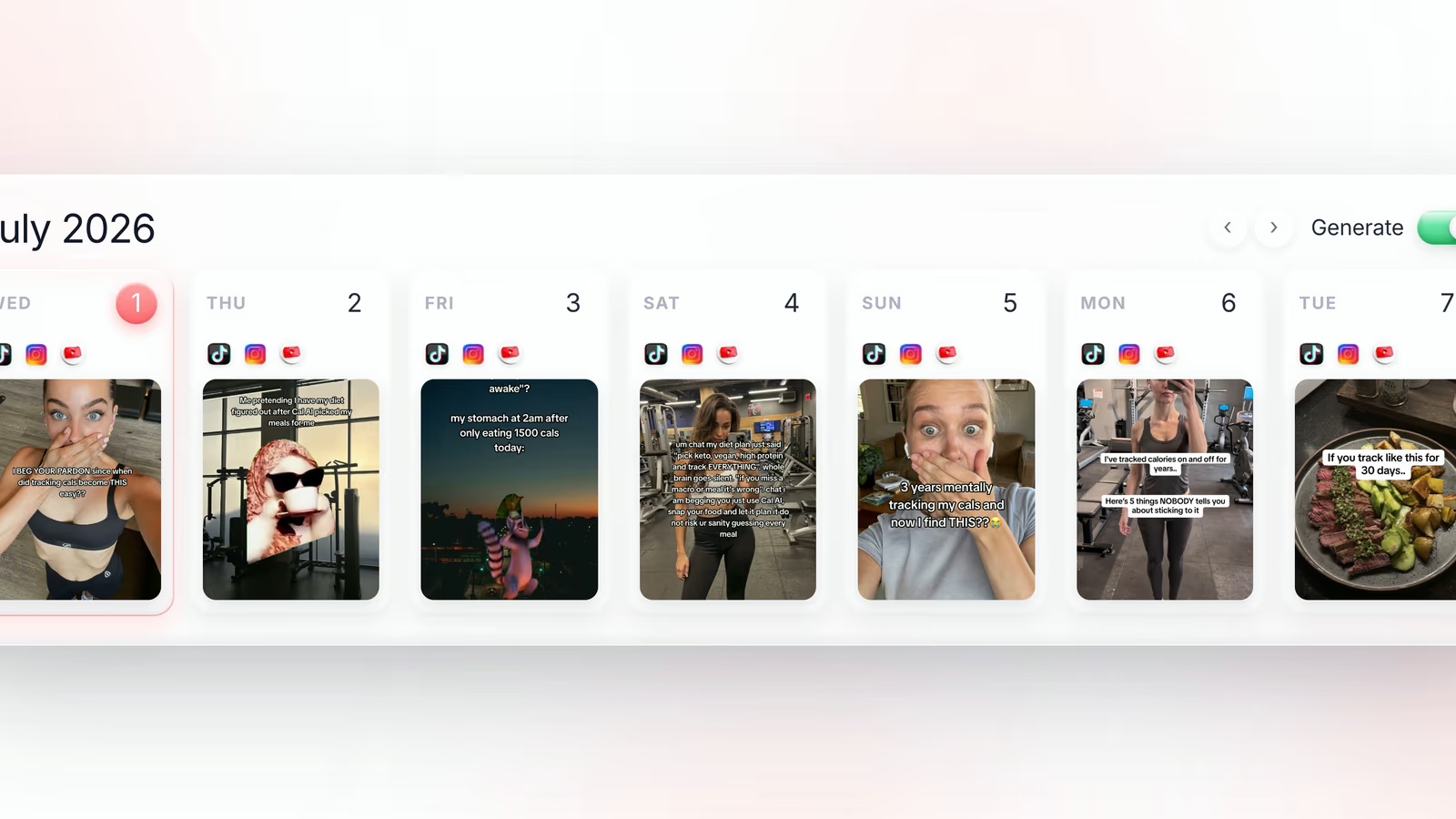
- Schedule: drop the survivors onto the calendar across the coming weeks, spacing formats so the feed does not run four memes in a row.
- Leave it: do not reopen the queue for a week. Re-litigating a scheduled batch is the most common way batching quietly turns back into daily posting.
How do you approve a month of content without burning a day?
Approval is the stage that breaks most batching workflows. Ninety pieces of content in a folder is a genuinely unpleasant object. Open them one by one in a file browser, and each decision drags in a small debate about whether the hook could be slightly better, which is how three hours vanish.
The fix is to make each decision small, fast and final. Fastlane does this with Blitz mode, a swipe-based approval screen that shows one generated post at a time and takes a yes or a no, in the style of a dating app. The interface removes the option to deliberate, which is the feature. A month of generated posts goes from an afternoon of file management to a few minutes of swiping, and the posts you keep are the ones that survived a gut reaction, which is roughly the same judgment a viewer applies in the first second of a scroll.
The batch is not the hard part. Deciding what not to post is the hard part, and it only gets easy when each decision takes one second.
What should you batch, and what should stay live?
Not everything survives four weeks in a queue. Evergreen formats do: product demos, founder explainers, objection-handling posts, before and after comparisons, and most AI UGC testimonials. Those can be batched a month out with no loss.
Trend-driven posts are different, because the sound or format they depend on can move within days. Batch those on a shorter horizon, one or two weeks, and refresh them rather than defending them. Fastlane's live trend remixing helps here, since it pulls the formats that are working right now and rebuilds your version of them, which means a trend slot in the calendar can be refilled quickly instead of sitting there going stale.
How do you schedule a batch across TikTok, Reels and Shorts?
Short-form is the one place where the same video genuinely works on every platform. A vertical clip that performs on TikTok performs on Instagram Reels and YouTube Shorts, and maintaining three separate edits of it is effort spent on nothing. A batching workflow should therefore schedule the same video to all three from one calendar.
This is what a social media scheduler is for, and it is also where most of them stop. Fastlane's TikTok scheduler publishes natively to TikTok, Instagram Reels and YouTube Shorts weeks ahead, but it also generates the content that fills the calendar, so the queue and the production line are the same tool. Scheduling a batch you had to make somewhere else solves half the problem and leaves the expensive half alone.
How do you know which batch worked?
Batching without measurement drifts, because the next batch gets built on a vague memory of what felt good last month. What you want is the ability to look at a finished batch and see which posts brought people in, not just which ones collected views. Fastlane attributes signups and sales to individual posts in unified analytics across all three platforms, which turns the next batching session into an editing job rather than a guessing one: generate more of the angle that converted, and stop generating the one that only entertained.
Over a few months this compounds. Batch one is a wide net. Batch four is narrow, because three months of per-post attribution has already told you which hooks, formats and characters your audience responds to.
Batch your first month with Fastlane
Batch content creation only works when generation, approval and scheduling live in one place. Fastlane turns your website URL into short-form content, gives you 1,000+ AI UGC characters plus slideshows, hook and demo videos and memes to fill a month with, lets you approve the whole batch by swiping through it in Blitz mode, and schedules the keepers natively to TikTok, Instagram Reels and YouTube Shorts with signups and sales attributed per post. There is a free plan with no credit card, and paid plans start at $29 a month.
Block out two hours, generate three times what you need, swipe through it, and fill the next month. Start at usefastlane.ai.
Frequently asked questions
What is batch content creation?
Batch content creation is a production method where a single working session produces a block of finished posts, which are then scheduled across the following weeks rather than published as they are made.
How long should a content batching session take?
A month of short-form posts is realistic in two to three hours once generation is automated, because the session is spent approving and scheduling rather than filming and editing.
How many posts should I batch at once?
Batch one month at a time, and generate about three times the number of posts you plan to publish so approval has something to reject.
Does batching hurt reach because the content is not spontaneous?
No. TikTok, Instagram and YouTube rank a post on watch time and engagement, not on when the file was created, so a scheduled batch and a same-day upload start from the same place.
How does Fastlane help with batch content creation?
Fastlane generates AI UGC videos, slideshows, hook and demo videos and memes from your website URL, lets you approve the whole batch by swiping in Blitz mode, and schedules the keepers weeks ahead to TikTok, Reels and Shorts.
What is Blitz mode?
Blitz mode is Fastlane's swipe-based approval screen, where each generated post is accepted or rejected one at a time in the style of a dating app, which is what keeps a large batch from turning into an afternoon of deliberation.
Should trend-based content be batched too?
Trend posts have a shorter shelf life than evergreen ones, so batch them for the next week or two rather than the full month and refresh them with live trend remixing when the sound or format moves.
Can I batch content for TikTok, Instagram and YouTube at once?
Yes. The same video can be scheduled to TikTok, Instagram Reels and YouTube Shorts from one calendar, which is the main reason batching scales better than posting to each app by hand.